Functionality
Feature Descriptions
Each USBExt3c is addressable and controllable from a host system via USB-C Control Port, Ethernet (TCP/IP), RS-232, or via a second USBExt3c over the HDBaseT-USB3 Link. Once connected, a BrainStem link is established to the onboard controller, enabling software control through the BrainStem API. This API provides full access to all module functionality from a host system.
USB Ports
The two full-featured ports (0 and 1) can be configured as upstream-facing host ports or downstream-facing device ports. The ports implement separate, independently switched USB HS and SS data, CC, VCONN and current-limited VBUS lines, supporting advanced USB testing applications.
The dedicated USB-C control port is a high-speed USB 2.0 connection for BrainStem interface and device power only. No other USB traffic can flow on this connection. Port-level features are controlled by the Port Entity
Port |
Index |
|---|---|
0 |
0 |
1 |
1 |
Control |
2 |
Automatic Host Port Switching Behavior
By default, any time a host-capable device is connected to any port on either end of the extension, it will become the host. This enables simple host switching for BYOD/M conference rooms: a laptop can temporarily take control of room AV equipment to host a meeting. When the laptop disconnects, the dedicated room PC becomes the host and regains control of the peripherals.
Programmatic Host Switching
For static installations or when a controller is managing host selection, port roles can also be assigned directly. For each USBExt3, the upstream-facing port role can be assigned to either port or to the HDBaseT-USB3 extension link.
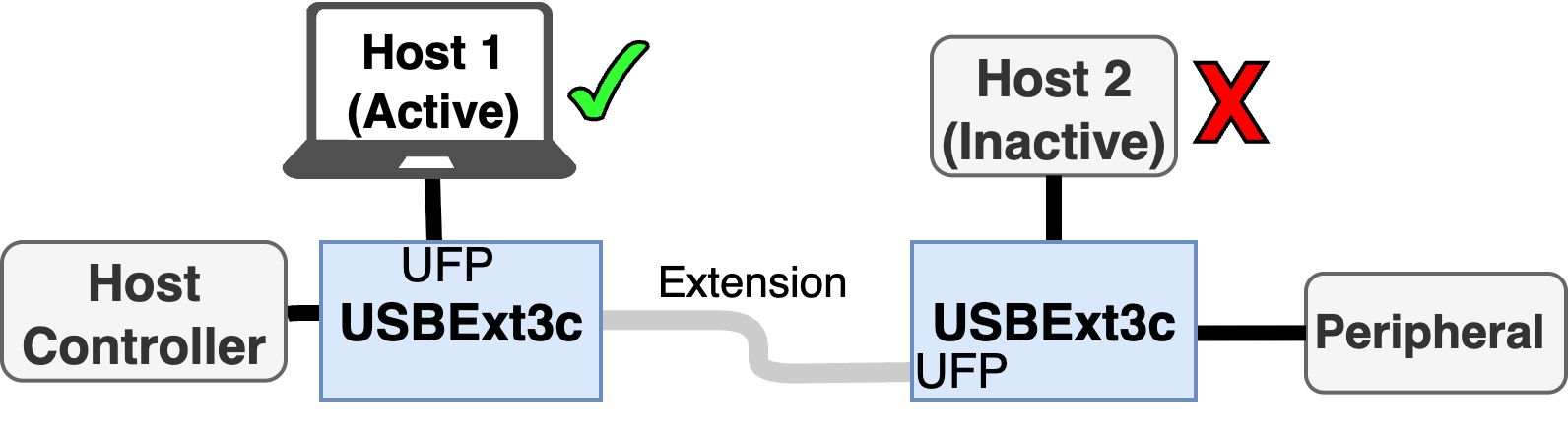
Programmatic host selection by assigning UFP port roles
Flexible Power Routing
The USBExt3c accepts power through any USB-C port and will operate with as little as 5 V (900 mA) for data-only extension, allowing bus-powered applications. For example, the host-side USBExt3c could be bus-powered by the host, while the device-side extender receives 5 V 900 mA a from a power adapter connected to the control port.
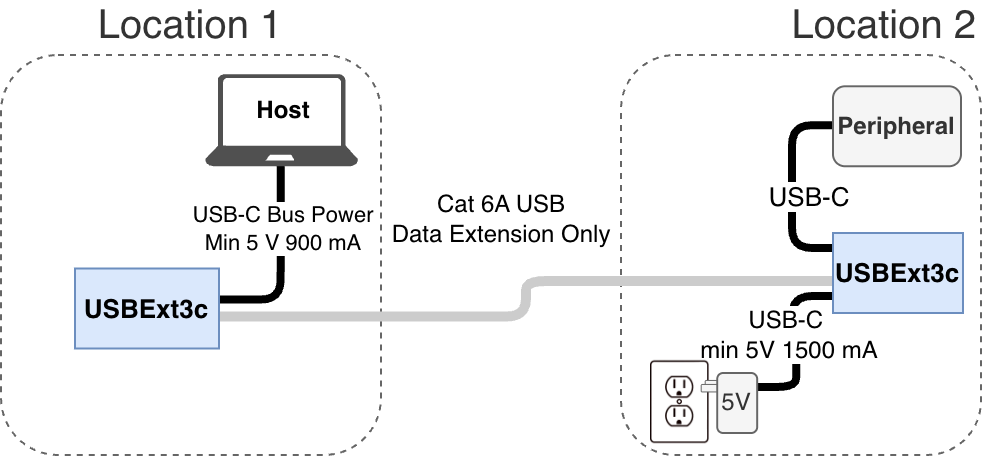
Minimal local power configuration
To power a pair of USBExt3c from a single power source (with PoE power provided to the second USBExt3c), the power supply must provide between 45 W and 100 W. When a single 100 W supply is connected to one USBExt3c, up to 60 W is available to devices on the second USBExt3c. For maximum device power, connect a 100 W USB-PD supply to each USBExt3c to provide 90 W shared per extender.
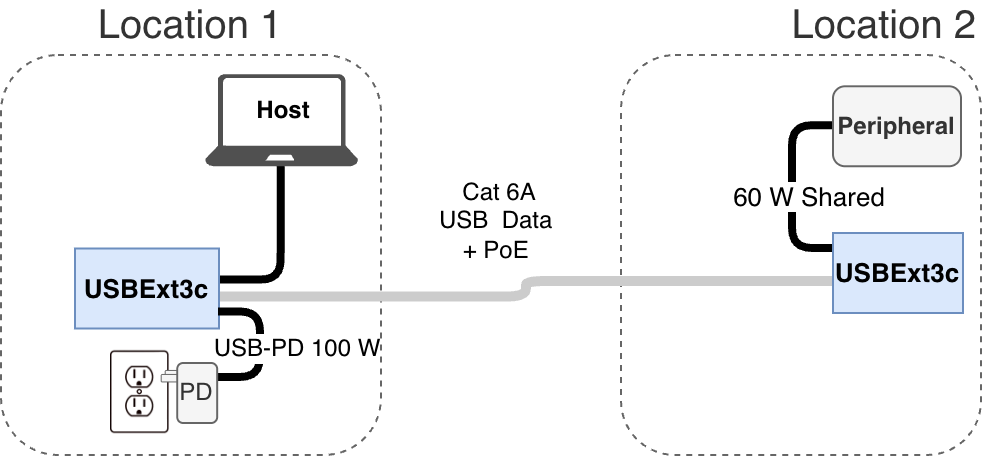
Power extension
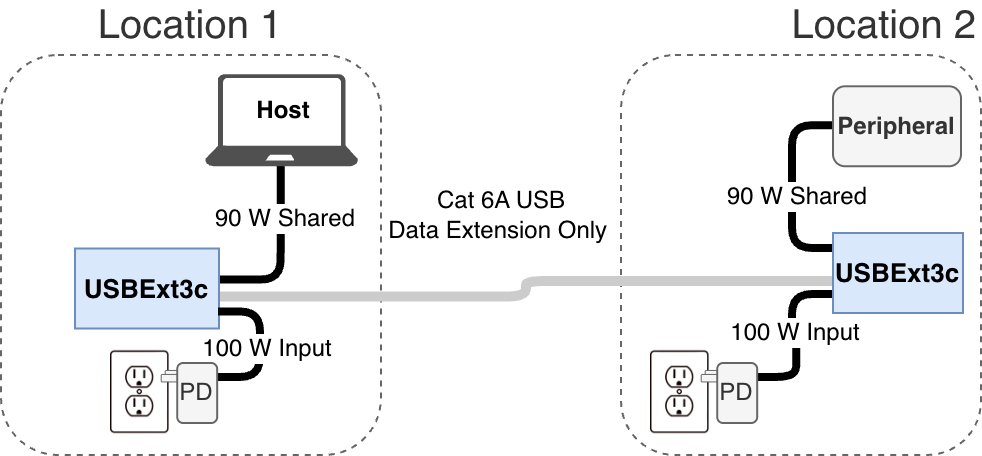
Maximum device power is available when both USBExt3c extenders are powered
RS-232 Extension
By default, the RS-232 ports are set to extend signals in Oversampled Mode where the RX and TX lines are sampled at 1.5 MHz and reconstructed on the other end. This allows host and clients to negotiate data rates independent of the extension. It is recommended to limit data rates to 150 k baud (1/10 of Fs).
Ethernet Control
The USBExt3c can be managed over Ethernet using the HubTool application, BrainStem API, REST interface, or built-in web interface. Connections are made through the Ethernet jack using TCP/IP sockets and are supported on the local link segment only. For most setups, we recommend a direct Ethernet link between the host test machine and the USBExt3c.
When using a pair of USBExt3c connected by HDBaseT-USB3, only one Ethernet connection is required; the second device is available through Brainstem networking over the extension link.
By default, the USBExt3c acts as a DHCP client and will receive an IP address from a DHCP server. If no server is detected, the USBExt3c falls back to a static IP address of 192.168.44.42. In static mode, the host computer interface IP must be set to an address in the 192.168.44.x range. The DHCP client is limited to hosts on the local link and does not operate across network bridges or gateways.
The USBExt3c responds to ICMP “ping” requests including broadcast pings. The brainstem API interface performs a discovery process prior to establishing communication be sending a UDP multicast request on port 9888. The USBExt3c responds with a message to UDP port 9889. The USBExt3c listens for socket connections on TCP port 8000.
Host firewall rules must allow:
- Outgoing UDP multicast on port 9888- Incoming UDP responses on port 9889- Outgoing TCP connections to port 8000- Incoming / Outgoing TCP connections on ports 9005 and 9006
HDBaseT-USB3 Configuration
The HDBaseT-USB3 port provides simultaneous extension of USB SuperSpeed, High-speed, RS232, and GPIO / frame sync data over Cat6A cable, along with bidirectional PoE++ Power. The HDBaseT-USB3 link direction normally operates in Automatic mode but can be manually configured for optimizing fixed installations.
Detailed HDBaseT-USB3 link parameters from either extender in the pair can be viewed in HubTool or accessed through the BrainStem API, including:
Index (local or remote)
State (Device present, Link role and status)
Serial Number
VS6320 Firmware Version
Cable Length (m)
Mean Squared Error (μdB)
Retransmission rate (# messages between retransmission, 0 = no errors)
Link Utilization (μ%)
Encoding state (e.g. PAM 8)
PoE++ Configuration
The PoE++ system will automatically manage power extension based on power sources and loads on either end of the extension. However, for testing, diagnostics, and advanced applications, low-level control and monitoring is provided, including:
Control:
Set Power Mode (PSE / PD / Auto / Off)
Set Sourcing Class Signature for pairs 1-2 and 3-4
Monitoring:
Power State (PD / PSE / Off)
Requested Class (Class requested from PD to PSE)
For pairs 1-2 or 3-4:
Sourcing Class (PoE class PD is trying to source)
Discovered Class (negotiated class)
Detection Status (valid connection, short, open, Hi Z, Lo Z)
Voltage (μV)
Current (μA)
Resistance (mΩ)
Capacitance (μF)
Power (mW)
Accumulated Power (mWh)