Indicators and Connections
Front Panel
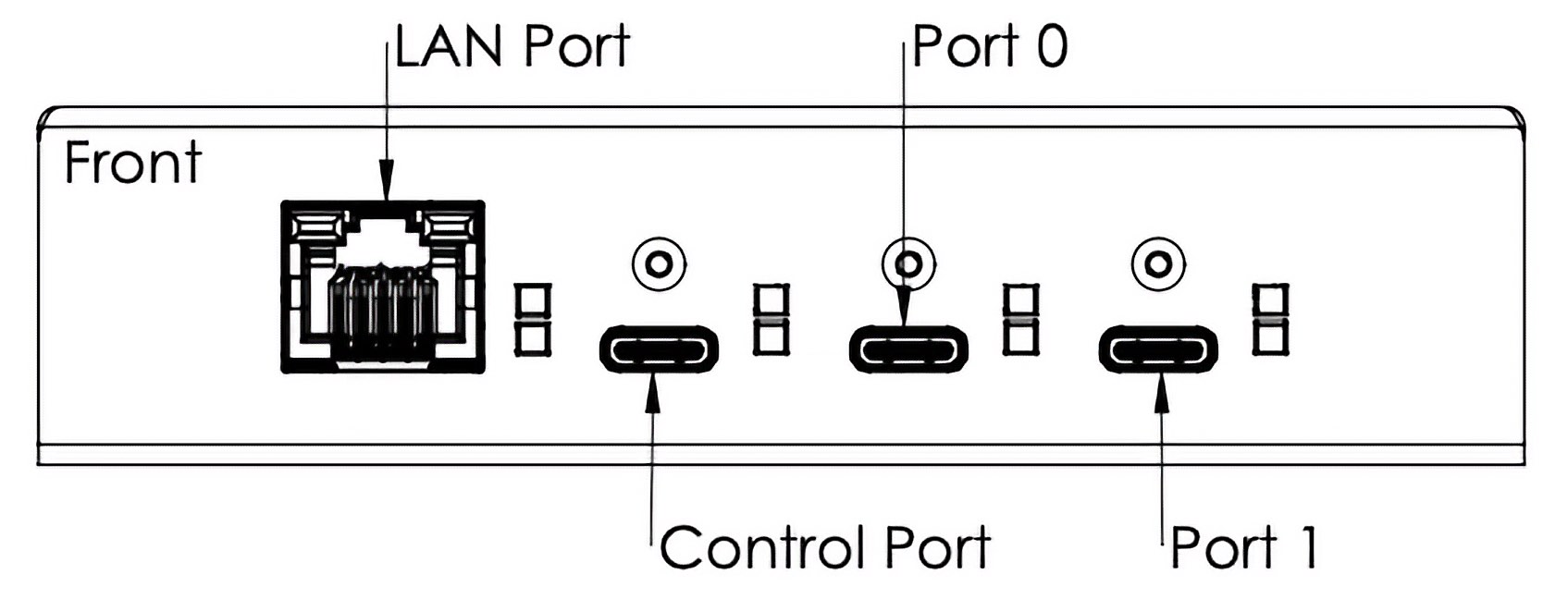
The front of the USBExt3c contains three USB-C receptacles (Control, Port 0, and Port 1) and one Ethernet port. The Control and Ethernet ports are dedicated for control communication between a computer and the USBExt3c. Port 0 and Port 1 connectors are full-featured hub ports.
Rear Panel

The back of the USBExt3c contains an HDBaseT-USB3 port and a 4-pin expansion connector for RS-232, frame sync, and GPIO. Chassis ground is accessed through a grounding screw.
Expansion Connector
The USBExt3c expansion connector is a 4-pin, 1-row, shrouded male header block with 3.81mm pitch. This interface provides additional mechanisms for expandability and testing scenarios.
Connection Name |
Pin Number |
Description |
|---|---|---|
TX |
1 |
RS-232 Serial Transmit (data from USBExt3c) |
GND |
2 |
Ground |
RX |
3 |
RS-232 Serial Receive (data to USBExt3c) |
IO1 |
4 |
General Purpose Input / Selector |
LED Indicators
Both the front and back panels of the USBExt3c have status LEDs to communicate device status and behavior. The names and meanings of these LEDs are explained in the image and table below.

Type |
Icon |
LED Name |
Color |
Description |
|---|---|---|---|---|
System |
|
User LED |
|
User-controllable LED |
|
Power / Watchdog |
|
Alternating Red and Magenta when powered |
|
Control |
|
BrainStem Link |
|
Link present |
|
BrainStem Heartbeat |
|
Blink when Heartbeat received |
|
HDBaseT- USB3 |
None |
HDBaseT-USB3 LEDs |
|
Solid Green: USB 3 link exists Solid Amber: HDBaseT-USB3 link exists Both flash during VS6320 firmware update |
Port Status: USB-C and HDBaseT -USB3 |
None |
USB Enumeration Speed (Top LED) |
|
USB 2.0 Hi-Speed up to 480 Mbps |
|
SuperSpeed 5 Gbps |
|||
|
SuperSpeed+ 10 Gbps |
|||
UFP/DFP (Bottom LED) |
|
Upstream (UFP) port |
||
|
Downstream (DFP) port |
|||
Ethernet |
None |
Ethernet Activity |
|
Green LED is solid when a link exists Amber LED blinks during activity |


