ControlRoom
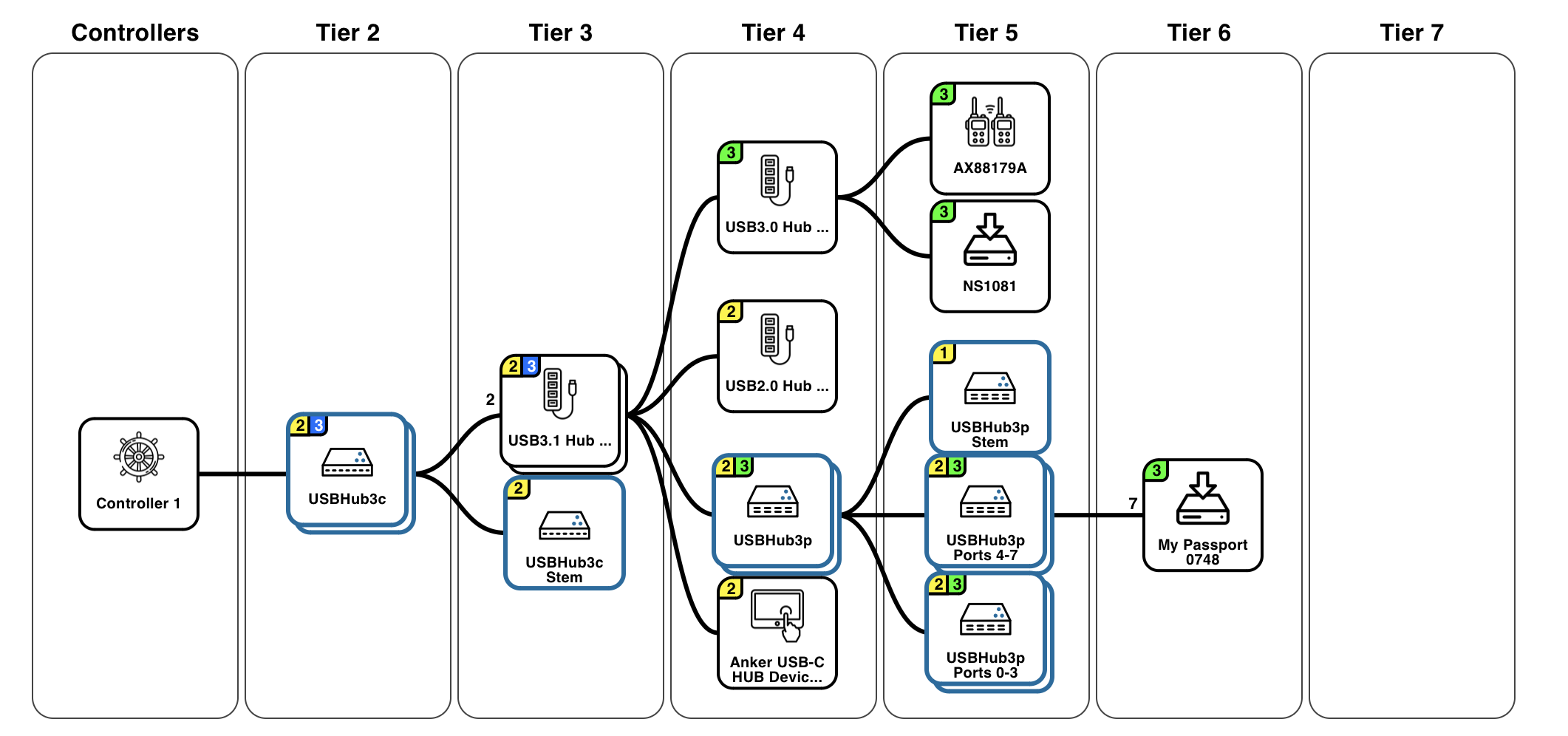
ControlRoom is a web application that lets you control, monitor, and reset USB ports in connected conference rooms through a browser. ControlRoom gives a real-time view of your system’s connected USB devices for easy troubleshooting and to ensure correct installation. Remotely resolve issues that would normally require a physical unplug / plug cycle.
The ControlRoom application also provides access to PowerRoom for power monitoring and UpdateRoom for device updating. ControlRoom and PowerRoom require an Acroname device with the ControlRoom add-on feature.
ControlRoom, PowerRoom, and UpdateRoom rely on the BrainD server application (included in the installation) to communicate with connected Acroname devices.
Features and Functions
Visualize the USB tree in a browser in real-time
Create device layout recipes via snapshots
Compare the current device layout to a loaded snapshot to validate installations and detect changes
View device status including:
Device connection speed
Custom devices names
Troubleshooting information
Control Acroname device functions including:
Toggle downstream port, simulating a device unplug / plug cycle
Useful to reset stuck devices
Swap upstream port to switch between hosts
Set upstream port selection mode
Save settings to non-volatile storage
Reset remote Acroname devices