
Mobile device manufacturers and refurbishers often need to ship devices at a defined battery state of charge (SoC), not just “fully charged.” In IATA’s 2026 lithium battery guidance, 30% SoC is already required for lithium-ion batteries shipped on their own, now also applies to batteries packed with equipment, and is strongly recommended for batteries contained in equipment. Storage best practices point in the same direction: don't leave devices fully charged for long periods. For example, Apple recommends storing iPhones at about 50% charge.
Devices don't always arrive at final packaging with the right charge level. They may need to be charged or discharged before shipment or storage.
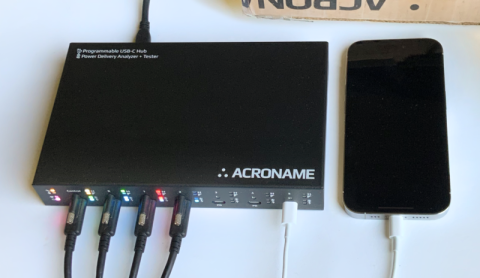
USBHub3c is an industrial USB hub that enables host-controlled automation of SoC management for USB-PD mobile devices, up to five per hub. A host system reads each device’s state of charge, then uses USBHub3c to charge, discharge, or hold it in a target range before shipment or storage.
Read SoC, control power, Repeat
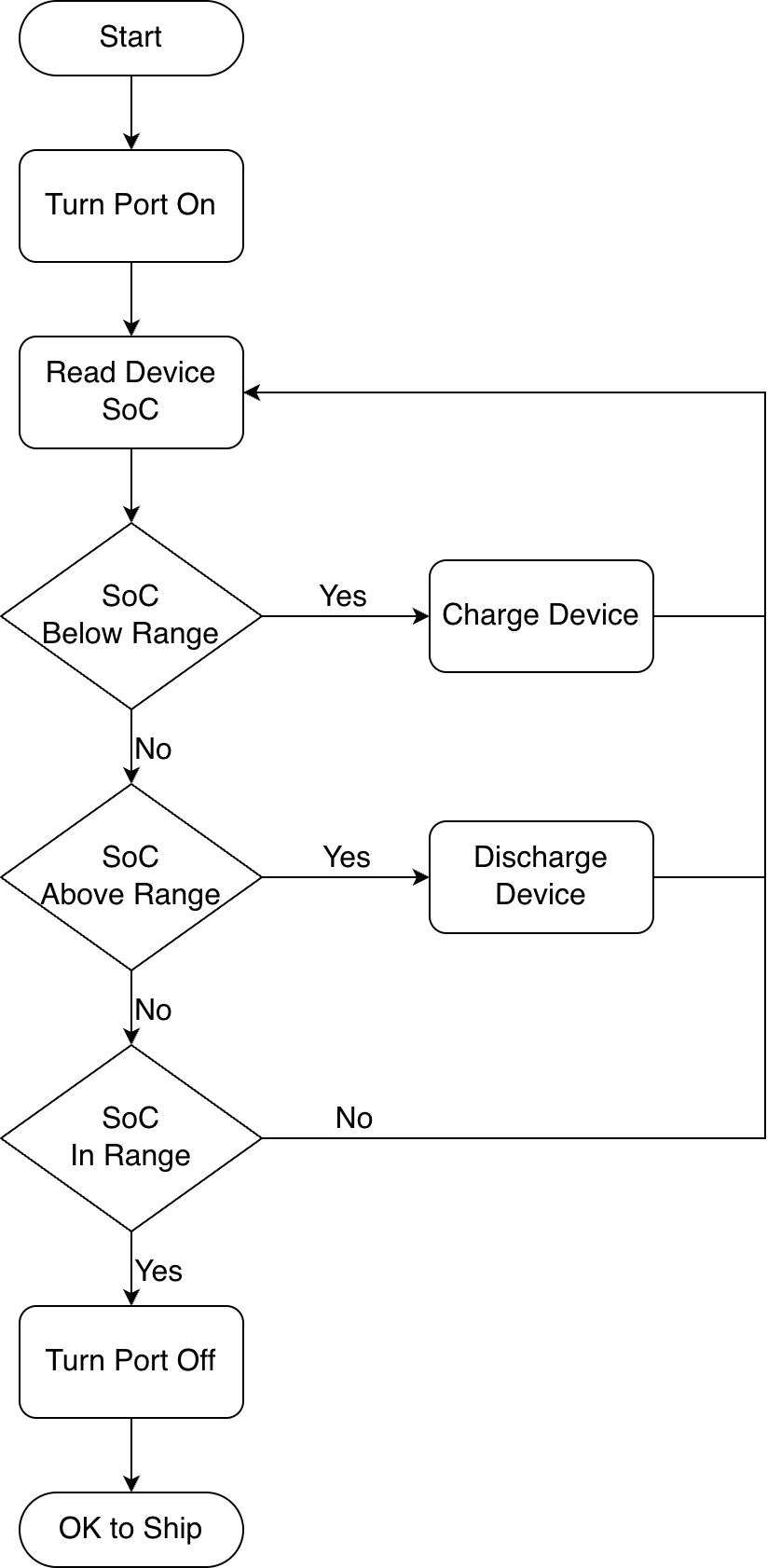
Controlling battery state of charge happens in a loop: read the device's current SoC, compare it to the target window, then change the power state until the SoC is in range. For shipment, that target might be around 30%. For storage, it could be closer to 50%.
USBHub3c provides the power control to automate this loop.
- If SoC is too low, charge the device.
- If SoC is too high and the device can act as a USB-PD source, discharge it through an external load.
- If SoC is too high and USB discharge is not available, stop net charging and let the device's own power consumption bring the battery down.
- If SoC is already in range, stop power flow or limit charging enough to maintain the target band.
Reading state of charge
To control SoC, the script needs a way to read it from each device. Battery charge level may be read directly through USB-PD battery status messaging or queried from the host side, depending on the device.
USBHub3c can't inspect USB 2 or USB 3 packet data directly - USB data passes through the hub. But the onboard BrainStem controller can log, decode, and inject PD messages while providing port control and electrical measurements.
Some USB-PD devices, such as iPhone 15 and newer, can provide battery status and capabilities over USB-PD. While there is a trend toward more adoption of PD battery messaging, it's still relatively rare. Most devices require using host-side tools instead.
For other Apple devices, SoC can be read on a macOS host with cfgutil, which is installed with Apple Configurator automation tools. On other host platforms, ideviceinfo from libimobiledevice can provide the same value. For Android devices, ADB is usually the most direct path.
Once SoC is known, the host script then directs USBHub3c to apply the appropriate power-control mode.
Power-control modes
Under host control, USBHub3c can apply three power-control modes: charge, discharge, and hold.
Charge
If the device is below the target range, USBHub3c acts as a source and allows the device to negotiate a USB-PD charge profile. The usual goal is to charge at the highest allowed current until the device approaches the target SoC, then reduce or stop charging to avoid overshoot.
Discharge
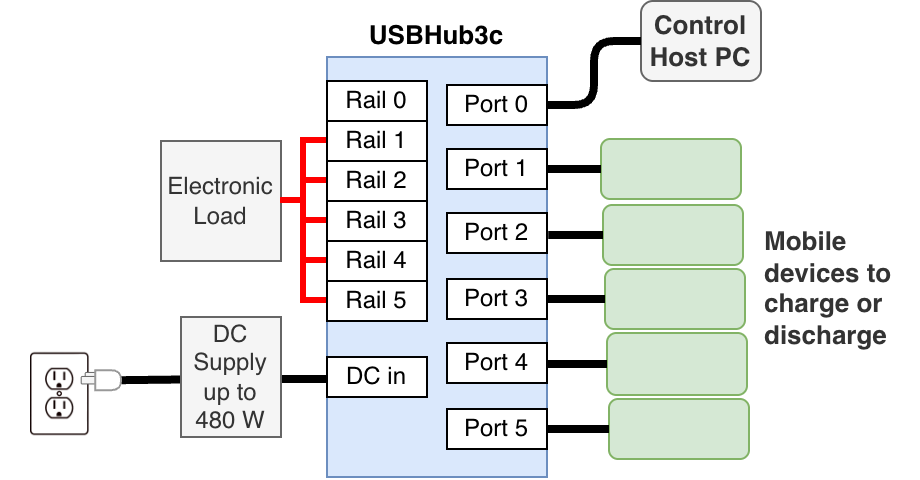
If the device is above the target range and can act as a USB-PD source, USBHub3c can discharge it over USB to an external load (requires external load add-on feature).
If it can't source power, discharge has to happen internally by running the device while avoiding net charging. In that case, USBHub3c can disconnect power, then periodically reconnect to check SoC and resume charging only if the battery falls below the target range.
Hold
If the device doesn't need to stay active, the easiest option is to stop charging and package it for shipment or storage.
If it does need to keep running, USBHub3c can either reconnect periodically to check SoC and recharge only when needed, or keep the USB connection up while advertising 5 V at the lowest current that still maintains a stable connection for that device. Some devices can maintain a data connection as low as 5 V, 0 A. Setting specific PDOs requires the PD Builder add-on feature.
Example end-of-line workflow
In a basic end-of-line setup, a host system connects to one or more devices through USBHub3c and runs a script that conditions each device to the required SoC before shipment or storage.
The script starts by identifying the connected devices and reading each device's current battery level. It then compares that value to the target SoC. A shipment workflow might use a lower target, while a storage workflow might use a moderate partial-charge target.
The script then applies one of the three power-control modes, Charge, Discharge, or Hold.
The script continues checking SoC at intervals until the device reaches the target band. Then the device can move to final packaging or storage.
A minimal charge/discharge station can be a host PC or Mac running the control script, a USBHub3c, and one or more attached phones or tablets. If discharge over USB is needed, the setup must also include an external load. SoC management may be combined with other USB host-connected tasks like firmware provisioning or self-test. Throughput can be scaled by adding more USBHub3c hubs.
Per-device workflow outline
For each connected device:
- Read the current SoC.
- Select the target window for the desired workflow (e.g. shipment or storage)
- If SoC is below range, enable charge mode.
- If SoC is above range and the device can source USB-PD power, enable discharge mode via external load.
- If SoC is above range and the device cannot source power, disable net charging and allow the device to drain internally.
- Wait, then read SoC again.
- Repeat until the device reaches the target band.
- Apply the desired hold behavior or disconnect power.
- Verify final SoC and mark the device complete.
A real script would add per-device policy, logging, timeouts, and recovery for dropped connections, but the control logic is still the same: read SoC, compare it to the target window, then charge, discharge, or hold until the device is in range.
Implementation notes
A typical script needs to:
- identify which device is connected to which USBHub3c port
- determine how SoC will be read for that device
- decide whether the device supports USB-PD discharge
- apply the correct charge, discharge, or hold behavior on that port
It is often worth validating each device model interactively in HubTool before automating it. That lets you confirm:
- how the device reports SoC
- whether it can source power for USB-PD discharge
- the lowest-power hold behavior that still maintains a data connection
Once those behaviors are known, a script can use the BrainStem API to automate the SoC management for that model.
Relevant APIs
The following BrainStem API calls cover most of the USBHub3c power functions. For more information, see the full USBHub3c API documentation.
Read SoC through USB-PD messaging
stem.hub.pd[x].request()
Where supported, this is used to send PD Battery Capabilities and Battery Status requests. Not all devices populate these messages with valid data, so PD-based SoC readout should be treated as optional and validated per model.
Map devices to ports
brainstem.discover.getDownstreamDevices()
This lets the script match a host-side device identifier to the correct USBHub3c port.
Charge or discharge the device
stem.hub.port[x].getEnable()/stem.hub.port[x].setEnable()stem.hub.port[x].getPowerMode()/stem.hub.port[x].setPowerMode()stem.hub.pd[x].getPowerRole()/stem.hub.pd[x].setPowerRole()stem.hub.port[x].getVbusVoltage()stem.hub.port[x].getVbusCurrent()
These are used to confirm that the port is enabled, in PD mode, set to the correct power role, and actually sourcing or sinking power.
Select a discharge profile and enable the external load
stem.hub.pd[x].getPowerDataObject()stem.hub.pd[x].setRequestDataObject()stem.hub.rail[x].setEnable()
These are used to confirm that the remote device can source power, request the desired PDO, and enable the external load during discharge.
Stop power flow
stem.hub.port[x].getEnable()/stem.hub.port[x].setEnable()stem.hub.port[x].getVbusVoltage()stem.hub.port[x].getVbusCurrent()
This is the simplest way to stop charging completely when a live connection is not required.
Stop power flow while maintaining data
stem.hub.pd[x].setPowerDataObjectEnabled()stem.hub.port[x].getDataSpeed()stem.hub.port[x].getVbusVoltage()stem.hub.port[x].getVbusCurrent()
This advanced hold mode requires the PD Builder add-on feature. In this workflow, all PDOs except the 5 V rule are disabled, and the 5 V rule is adjusted to advertise 0 mA. The script can then confirm that the data connection is still up and that port current is near zero.
Add-on features
Depending on the workflow, some of the following add-on features may be required:
PD Builder
PD Builder is the main add-on for charge control. It allows USBHub3c to advertise the PDOs needed for the desired source behavior, making it possible to charge quickly when the device is well below target, then reduce current or change the advertised profile as the device approaches the target SoC. It is also required for the advanced hold mode that preserves data connectivity while advertising a single 5 V, 0 A PDO.
PD Logger
PD Logger allows USB-PD communication to be logged and decoded. It is specifically necessary for USB-PD Battery Status messaging, but also useful to view and log device responses to PDOs.
External Load
This feature allows an external load to be connected so that source-capable devices can discharge over USB through USBHub3c instead of waiting for passive drain.
Validation and automation tools
HubTool is a cross-platform GUI application for interactive control and validation. It is useful for checking how a device behaves before writing automation around it, and is also a great debugging tool.
The BrainStem API provides programmatic control of USBHub3c from host software. In an SoC-conditioning workflow, the API lets a script manage charge, discharge, and hold behavior repeatedly, and can be integrated into manufacturing or refurbishment processes.
Validation notes
Not every USB-PD mobile device supports the same SoC readout, discharge behavior, or low-power hold mode. Each device model should be validated before it is rolled into production automation.
Conclusion
For mobile device manufacturers and refurbishers, specific battery state of charge is often a requirement for shipping or storage. Devices may arrive at final packaging above or below the desired range and need charging or discharging before they are ready to leave the line.
A host system reads SoC, then uses USBHub3c to automate the charge - discharge - hold cycle to get each device to the required range before shipment or storage. BrainStem API scripting makes it easy to integrate into end-of-line and refurbishment processes.
Add New Comment