System Tab
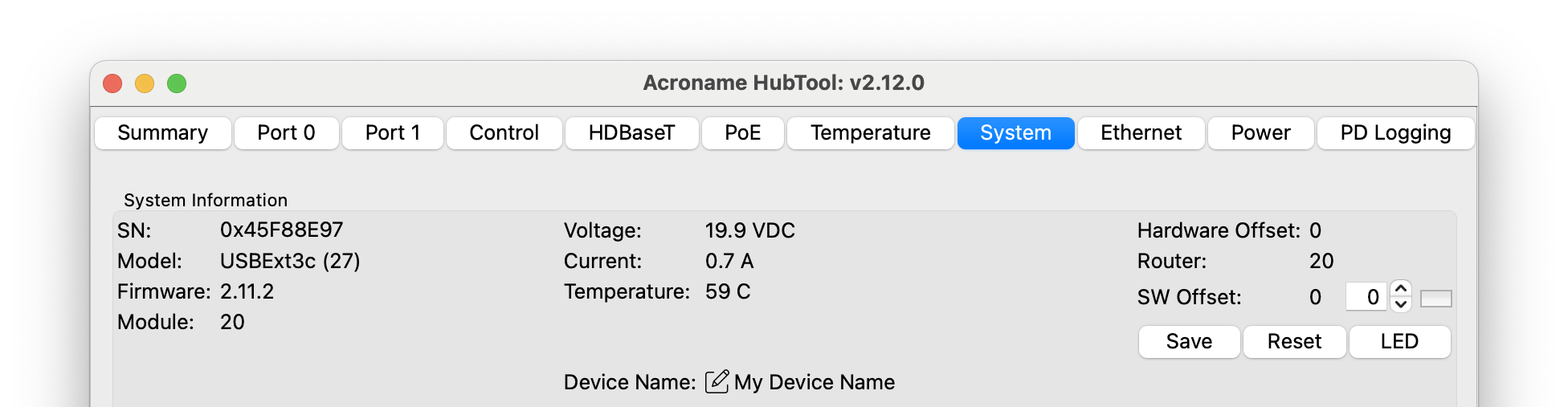
HubTool USBExt3c system tab
The system tab contains information and settings for the USBExt3c.
System information
Heading
Meaning
SN
USBExt3c serial number
Model
Model name and number, e.g. USBExt3c (27)
Firmware
Currently installed firmware version
Module
Address of the module on the Brainstem network
Voltage
Voltage at the input power source port
Current
Input current at the input power source port
Temperature
System temperature
Hardware offset
Increments Brainstem module address by a hardware setting - fixed to 0 in USBExt3c
Router
Address of the routing Brainstem module
Software offset
Increment the module address. Click the button to send to the device, Save and Reset to apply
Save
Store select changed settings
Reset
Soft reset of the Extender
LED
Toggles blue User LED (
person icon next to the control port), used for debugging and to identify the extender