USB-C-Switch Pro
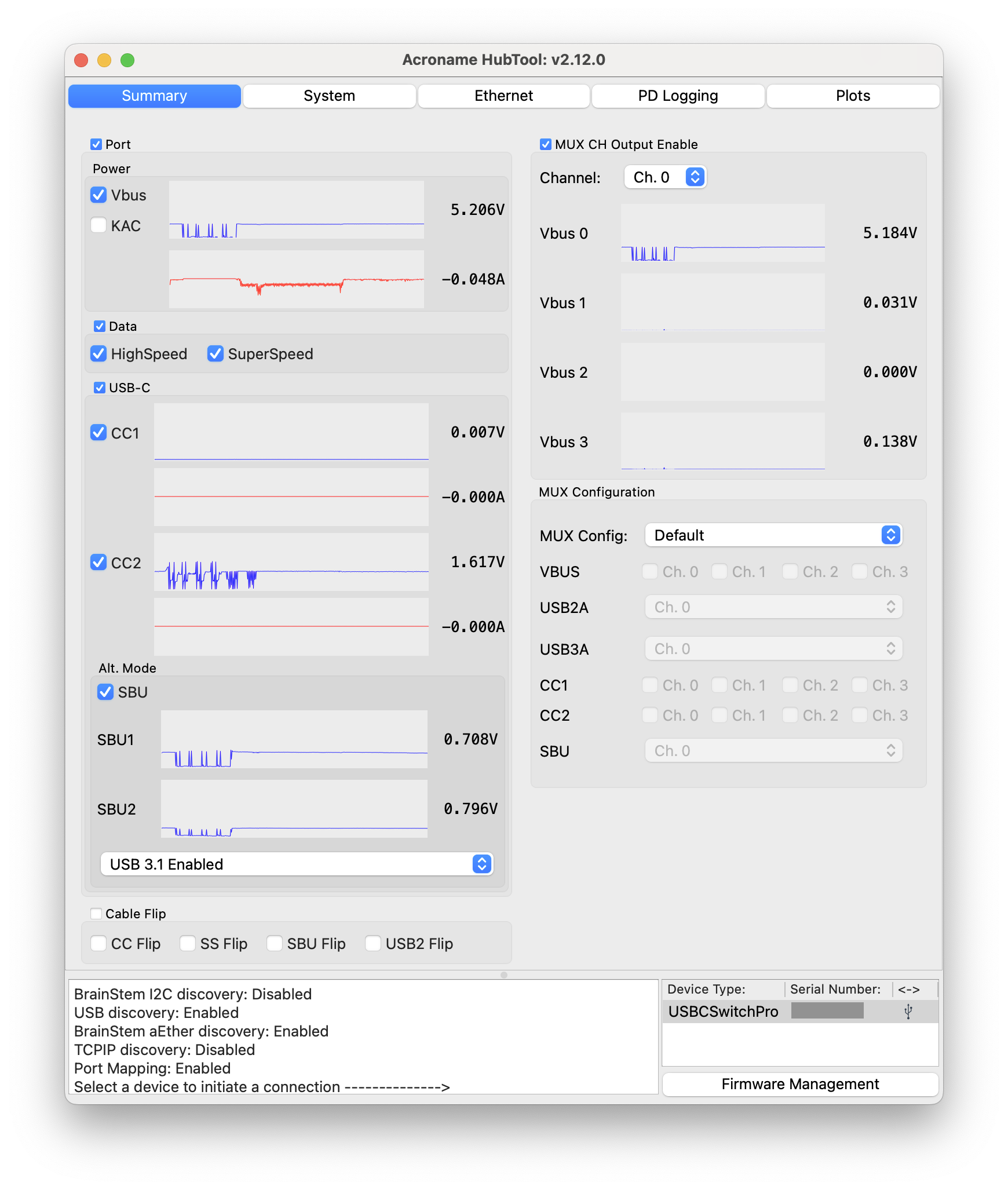
HubTool interface for USB-C-Switch-Pro
Acroname’s USB-C-Switch Pro is a managed USB4 1:4 / 4:1 port selector and multiplexer switch supporting 240 W USB Power Delivery Extended Power Range (USB PD EPR) and 8K@120 Hz DisplayPort Alt mode video pass through.
The USB-C-Switch Pro is not a hub — it directly connects and redrives signals from the common port to one of four mux channels or from one mux port to the common port, appearing like a cable to the connected devices. Data link, power negotiations, and power between USB devices are managed by the attached devices themselves.
When combined with an Acroname Universal Orientation Cable , the USB-C-Switch Pro can emulate a cable flip, allowing tests of all the connections on a port without the need to manually flip the cable.
HubTool presents a unified dashboard to control and view the state of USB-C-Switch Pro.
Connections
Port |
Connects to |
||
|---|---|---|---|
Control, Ethernet, or RS-232 |
Control computer running HubTool |
||
Common |
Common host |
or |
Common device |
Ports 0 – 3 |
Switched devices |
Switched hosts |
|
DC Power |
Optional DC power supply |
||
Add-on software features
USB-C-Switch Pro supports add-on software features, which can be purchased to enable new capabilities. When a USB-C-Switch Pro is selected in HubTool, the console will list the available add-on software features and show their enabled / disabled status on the device.
Feature |
Capability |
|---|---|
Log USB-PD communications on all ports |
|
Enable RS-232 serial control of the Switch |
Licenses for additional features are available for purchase. After purchase, update the hub firmware to enable the new features.
Dashboard tabs

HubTool USB-C-Switch Pro dashboard tab view
After selecting USB-C-Switch Pro, HubTool will launch the device dashboard in summary view. Buttons along the top of the window represent tabs for:
Each tab except Summary can be dragged out of the main hubtool window into its own window to allow simultaneous viewing of multiple tabs.