
What stays the same, what's new, and when you need to change your scripts.
The short answer
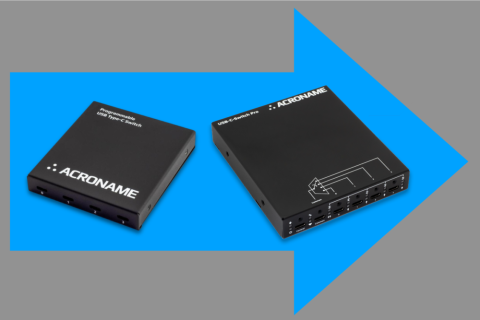
USB-C-Switch Pro (S110) extends USB-C-Switch (S85) to 240 W and 40 Gbps, and adds USB Power Delivery monitoring and injection, along with Ethernet, serial, and GPIO control.
Existing USB-C-Switch users can swap in a USB-C-Switch Pro and continue using existing automations. This means the just by swapping hardware, you gain USB-PD EPR and USB4/Thunderbolt 3 support. In scripts that explicitly assume a USB-C-Switch, the only update is to select the Pro module class based on the discovered model. All new capabilities are optional.
What stays the same
BrainStem API continuity
USB-C-Switch Pro uses the same BrainStem package and programming model as USB-C-Switch. Discovery, connection via a Spec, and access to core BrainStem entities follow the same patterns. Scripts written for USB-C-Switch do not need to be restructured to accommodate USB-C-Switch Pro.
At the API level, USB-C-Switch Pro appears as another supported device model rather than a separate platform. Existing code that discovers modules, connects, and controls switching works the same.
Unchanged automation workflows
Common USB-C-Switch features and workflows carry over directly:
- 1:4 / 4:1 Mux Port selection
- Port data and power enable / disable
- Cable orientation testing
- DisplayPort Alt Mode switching
- Split mode routing
- Voltage and current monitoring
- Control via USB-C Control port
These operations use the same entities and method calls. Branching on device type is just required when accessing Pro-only features. From a software perspective, the control model is unchanged.
What's Been Added
USB-C-Switch Pro expands the operating range without changing how the device is controlled. The differences are expanded power and data rates, PD protocol visibility, Ethernet Control, and RS-232/i2c/GPIO coms.
Power and data envelope
USB-C-Switch Pro supports USB Power Delivery Extended Power Range (EPR), enabling higher voltages and currents than USB-C-Switch. This enables automated testing of EPR-capable ports without manual cable swaps.
On the data side, USB-C-Switch Pro supports USB4 / TB3 and higher-bandwidth DisplayPort 2.1 Alt Mode. This is enabled by improved signal conditioning and bandwidth in the data path.
PD Protocol-level visibility
USB-C-Switch Pro adds access to USB Power Delivery state and messaging through a dedicated PD entity. This follows the same BrainStem entity model used on USBHub3c, but it is viewing/injecting PD traffic between host and device without a hub controller in the middle, so you can see attach / detach, renegotiation, and role swaps exactly as they occur between host and device.
Ethernet control and scaling
USB-C-Switch Pro can be controlled over local-link Ethernet using the same BrainStem discovery and connection abstractions used in Acroname's other network-capable devices. This adds flexibility in placement of the control host anywhere that an Ethernet cable can reach, not necessarily in the same rack as the devices-under-test.
RS-232, I2C, and GPIO control
USB-C-Switch Pro adds managed RS-232, I2C, and GPIO interfaces for integration with external test equipment and control systems. RS-232 and I2C provide interfaces that can be used both to control the switch (for example, port selection and configuration) and to communicate with external devices such as controllers, fixtures, or peripherals. GPIO pins can be configured as inputs or outputs and are set or read through the API. This can enabling port selection and simple triggers without a control host, or allow a single script to control the USB-C-Switch and external equipment.
Using USB-C-Switch and USB-C-Switch Pro together
The USB-C-Switch and USB-C-switch Pro can used side by side on the same host, selected based on device-under-test requirements. Use the USB-C-Switch Pro where EPR-class power, USB4 data rates, or PD protocol visibility are required, but keep using the USB-C-Switch for SPR / up to USB 3.2 ( 10 Gbps) DUTs. Both devices can be managed together without splitting codebases or workflows.
When you actually need to change code
Most existing USB-C-Switch scripts run unchanged on USB-C-Switch Pro. Code changes are required only when accessing capabilities that do not exist on USB-C-Switch.
In practice, this means adding some logic based on the discovered device model or available entities. The rest of the script remains unchanged.
from brainstem.discover import findAllModules
from brainstem.defs import (
    MODEL_USB_C_SWITCH,
    MODEL_USB_C_SWITCH_PRO,
)
from brainstem.stem import USBCSwitch, USBCSwitchPro

specs = findAllModules()

for spec in specs:
    if spec.model == MODEL_USB_C_SWITCH:
        switch = USBCSwitch.connectFromSpec(spec)
    elif spec.model == MODEL_USB_C_SWITCH_PRO:
        switch = USBCSwitchPro.connectFromSpec(spec)
    else:
        continue

    # Common workflows apply to both devices
    switch.usb.enable.set(1)
    switch.mux.select.set(0)

    # Pro-only capabilities are explicitly gated
    if spec.model == MODEL_USB_C_SWITCH_PRO:
        pd = switch.pd[0]
Transition in practice
USB-C-Switch can stay deployed where it already works. USB-C-Switch Pro can be added or swapped in where higher power, higher data rates, or PD visibility are required. Both devices can coexist on a control host and the USB-C-Switch pro is a drop-in replacement with no (or trivial) change to software. This decouples software tasks from hardware upgrades: scripts can be rewritten if and when extended Pro features like PD logging become necessary. For new projects, consider whether the capabilities of USB-C-Switch Pro will be needed during the duration of the program.
Add New Comment